RTMP stream keys
Keep source credentials organised for each configured channel.
VDO Panel gives broadcasters one place to manage stream keys, channel settings, VOD media, recordings and viewer information around an RTMP-to-HLS video workflow.
Copy the RTMP endpoint and stream key into OBS or another compatible encoder, start the live source and use the panel to manage the channel, recordings and on-demand assets.
View Video Packages →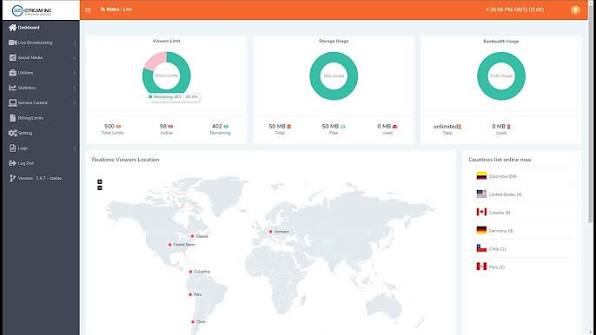
Keep source credentials organised for each configured channel.
Publish a web-friendly stream that can be integrated into websites and supported players.
Upload prerecorded programmes, replays and visual-radio segments.
Capture compatible live streams so programmes can be reused after broadcast.
Monitor channel activity and audience levels through the control panel.
Use a prepared streaming environment instead of assembling FFmpeg, web delivery and panel components yourself.
VDO Panel is a browser-based management platform for live and on-demand video streaming. A hosted VDO Panel service provides the underlying streaming environment and presents broadcasters with a control panel for channel operations. This is useful for stations and creators who want to manage RTMP inputs, HLS outputs and VOD media without maintaining every component of the server stack manually.
The normal workflow is straightforward: obtain the channel's RTMP server URL and unique stream key, open the Stream settings in OBS Studio, choose a custom service, paste the credentials and begin sending video. The encoder controls your scene layout and production, while the server is responsible for distributing the stream to viewers.
VDO Panel hosting is well suited to visual radio where studio cameras, presenter video, artwork or song information accompany the audio station. It can also support internet TV concepts, community channels, worship services, event streams and other continuous or scheduled broadcasts.
A live channel can be combined with stored video so viewers can watch programmes after the original broadcast. VOD storage is useful for show archives, interviews, event replays and prerecorded blocks that form part of a 24/7 schedule.
Estimate your target resolution, video bitrate, concurrent viewers and VOD storage before selecting a plan. A 720p single-event stream has very different requirements from a continuous Full HD visual-radio network. Planning these numbers early reduces buffering risks and avoids paying for capacity you do not need.
Compare viewer capacity, resolution and VOD tiers.
View packages →Embed your video or visual-radio experience into a custom site.
Explore websites →Combine station audio, metadata and selected video features in an app.
Explore apps →Read the OBS and VDO Panel connection steps.
Open guides →Not when you choose a hosted VDO Panel service. The streaming environment is provided and you manage the channel through the panel.
Yes. OBS can send the live feed to the RTMP endpoint and stream key supplied for the channel.
Compatible packages include Video On Demand storage and management.
Recording is available in compatible workflows and packages. Confirm storage capacity before relying on long-term archives.
HLS output is designed for modern web delivery and can be integrated into a compatible website player.
Share your target resolution, expected viewers, encoder and VOD requirements and we will help size the service.